Voice GPS Navigation: GPS Map
- 4.6
- Rating
- 1.00M
- Installs
- Free
- Price
 Analysis by App-foxy
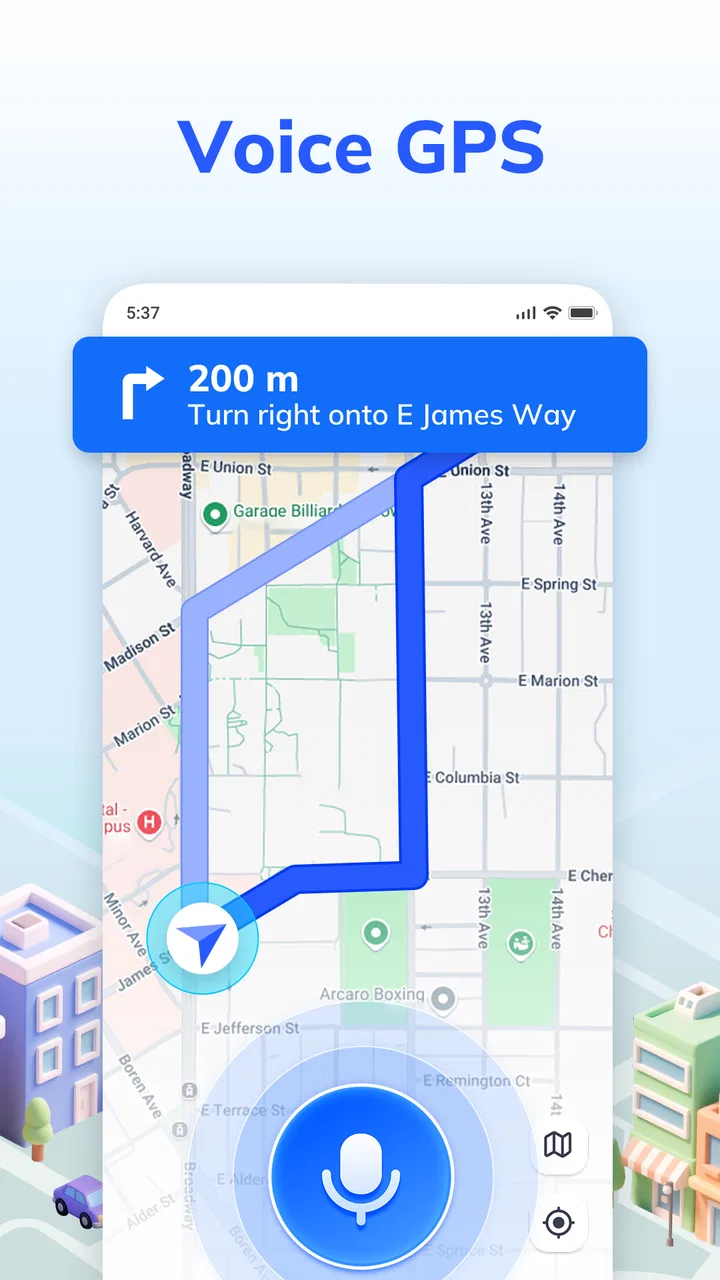
Voice GPS Navigation: GPS Map is the kind of driving app I would try when I want spoken directions without turning navigation into a complicated project. It sits in the Maps & Navigation category, comes from Handy Tools Studio, and focuses on the basic promise of guiding a driver with GPS maps, route directions, and voice prompts. After using it, my impression is that its value depends less on flashy extras and more on whether it gets three everyday things right for you: finding a reliable position, presenting a usable route, and speaking clearly enough that you do not need to keep looking at the screen.
The app is free to install and is rated for Everyone, which makes it approachable for a broad range of users. Its listing shows a 4.8 average from around 4.4 thousand ratings, with more than a million installs. Those figures suggest that it has found an audience, but they do not remove the need to test it in the places where you actually drive. Navigation apps can feel excellent on an open road and frustrating in a dense city, a parking garage, or an area with weak positioning. My review therefore centers on practical use: getting started, recovering when a route behaves unexpectedly, and knowing when the phone or surroundings are the real problem.
Getting started without the usual navigation frustration
The first place many people get stuck is before the first trip begins. A voice navigator may appear simple, but several small choices affect the experience. I recommend opening Voice GPS Navigation: GPS Map while stationary, checking that the destination is entered correctly, and looking at the proposed route before moving. That short pause is more useful than trying to correct an address while already driving.
You May Also Like

 Blood Strike: 2.5 Anniversary
Blood Strike’s Loadouts Turn Every Drop Into a Tactical Gamble
A close look at Blood Strike’s custom loadouts: how fast access to signature weapons reshapes its battle royale rhythm, rewards preparation, and narrows the gap between fights.

 Pandora - Music & Podcasts
Pandora’s Music Is Easy to Start, but Harder to Recover
Pandora’s strength is its low-effort path from a seed to a station. Its weak spot is how much confidence it asks you to place in connection, setup, and quiet recovery.

 8 Ball Pool
 Is Built on Rivalries, Rematches, and Routine
A close look at the rivalries, rematches, shared routines, and unanswered safety questions that turn a quick pool match into a persistent mobile community.

 Samsung Music
’s Quiet Strength Is Playing What You Already Own
Its reach comes less from spectacle than from dependable access to a personal library. That simplicity is both the app’s strongest retention engine and its ceiling.

 AccuWeather: Weather Radar
AccuWeather Review: A Quick, Clear Forecast for Everyday Decisions
For everyday plans, the best forecast is the one you can understand quickly. AccuWeather makes rain timing, radar, and local conditions easy to act on, with a few trade-offs.

 Hill Climb Racing
Why Hill Climb Racing Still Turns Crashes Into One More Run
A tiny car, a bumpy hill and one more upgrade: Hill Climb Racing keeps resurfacing because its simple chaos makes every near-miss feel personal.
More From Our News Desk



Use a complete destination rather than relying on a vague place name. A business can have several branches, and a street may exist in more than one town. If the result looks wrong, I would edit the search before starting guidance instead of trusting the first match. This is particularly important when visiting a large site such as a hospital, shopping center, campus, or sports venue, where the road entrance may not be the same as the pedestrian entrance shown in a search result.
The app’s main appeal is voice guidance, but spoken directions work best when the phone is placed where the driver can hear them naturally. I would avoid laying the device flat in a cup holder or putting it somewhere that makes the speaker difficult to hear. If the voice seems silent, I would first check the phone’s media volume rather than only the ringtone volume. A phone can appear loud while navigation instructions remain too quiet because those controls are not always treated the same way.
Before leaving, I would also check whether the phone is connected to the car in a way that sends sound to the intended speaker. Bluetooth connections can redirect audio to a vehicle even when the user expects the phone speaker to talk. The reverse can happen too: the car may be connected for calls while navigation audio is still coming from the handset. This is not a flaw unique to this app, but it is one of the most common reasons a voice navigator seems broken.
Another useful habit is to start a short test route near home. I prefer a familiar destination because it lets me judge the timing of spoken prompts without the stress of an unfamiliar journey. Listen for whether the instructions arrive early enough to be useful and whether the screen is readable in the light conditions you normally drive in. If the experience is uncomfortable on a familiar road, a long trip will not improve it.
Small setup checks that make a large difference
Location accuracy is the foundation of any GPS navigation app. I would confirm that location access is enabled for the app and that the phone itself can determine its position outdoors. If the position marker jumps, remains still, or appears on a nearby road, I would move into an open area and wait briefly before assuming the route engine is at fault. Tall buildings, covered parking, tunnels, and heavy tree cover can all interfere with a phone’s view of positioning signals.
Battery management deserves attention as well. Long navigation sessions use the screen, location services, and audio, so a phone that is already low on power may become unreliable before the trip ends. I would begin with a reasonable charge and use a car charger for longer drives. If the phone becomes hot, I would remove unnecessary apps from active use and keep the device out of direct sunlight. Heat and power limits can cause slowdowns that look like navigation errors.
It is also worth checking the current app version before an important journey. Voice GPS Navigation: GPS Map is listed at version 1.5.3 and supports devices running Android 6.0 or later. That broad compatibility is helpful for people with older phones, although older hardware may still respond more slowly than newer devices. I would not use the first day with a newly updated app as the only test before a critical appointment; I would run a short local route and make sure the behavior is normal.
The app includes in-app purchases ranging from $4.99 to $24.99 per item. Since the basic app is free, I would explore the free experience first and decide whether any paid option addresses a problem I actually have. This is a better approach than paying immediately for the hope of improved navigation. A purchase cannot fix an obstructed GPS signal, an incorrect destination, or a phone whose audio is routed elsewhere.
One point I would clarify before relying on it for a remote trip is how much of the journey depends on an active connection. I would prepare for the possibility that searching for a new destination or refreshing route information may be less dependable when connectivity is poor. In a rural area, I would plan the destination while I still have a stable connection and keep a basic backup plan, such as knowing the main roads and the final address. That is sensible with any phone-based navigator, especially when the journey matters.
Recovering when the route stops making sense
Even a good route can become confusing after a missed turn. My first rule is not to make a sudden maneuver just because the map seems to be recalculating. Continue safely, follow the road, and let the app reassess the position. A missed exit is inconvenient; an abrupt lane change is dangerous. If the spoken instruction and the road signs appear to conflict, I would prioritize safe driving and visible road signage, then stop somewhere legal if I need to inspect the route.
When the position marker is clearly wrong, I would avoid repeatedly tapping the screen while moving. Pull over, check that location is enabled, and see whether the phone has regained a stable position. Restarting the app may help after a temporary freeze, but I would treat that as a recovery step rather than a substitute for checking the phone’s basic location behavior. If other map apps also show the same incorrect position, the cause is probably outside Voice GPS Navigation: GPS signal conditions, device settings, or the surrounding environment are more likely explanations.
There is a practical distinction between a bad destination result and a bad route. If the app sends you to the wrong part of a property, the search result may be the issue. If it places you correctly but suggests a road that is closed or unsuitable, the route information may be out of date or based on conditions that have changed. In either case, I would compare the proposed path with road signs and local restrictions before following it automatically.
For a destination with several possible entrances, I would add a nearby, recognizable road or public entrance as the first target, then use the final address once I am in the area. This two-step workflow is especially useful for large complexes. It reduces the chance of being guided toward a service entrance, private lane, or pedestrian-only approach. That is one of the more valuable habits I would carry into using this app, because it improves the input rather than expecting the navigator to understand every property layout perfectly.
Voice prompts can also be misunderstood when the driver is already familiar with a route. I would listen for the direction and distance, but still use the map and road signs as confirmation. A spoken instruction that sounds late may actually be correct for the next junction, while a driver’s assumption about the road can be wrong. Keeping the phone mounted in a stable position makes it easier to glance briefly at the visual route when safe, rather than trying to interpret an unclear prompt by memory.
When the phone, signal, or road is the real problem
Navigation apps are often blamed for conditions they cannot control. A tunnel can interrupt positioning, a multi-level road can confuse the apparent location, and tall buildings can make the marker drift between nearby streets. In those situations, I would expect a temporary loss of precision and give the app time to recover after returning to open sky. The right response is slower, safer driving, not constant route editing.
Car audio introduces another layer of uncertainty. If prompts disappear after connecting to the vehicle, I would test the phone speaker while parked, then reconnect the car and check its media source. If music plays but navigation does not, the issue may be the vehicle’s audio selection. If all audio is silent, the phone may be muted or its media volume may be low. These simple tests can prevent an unnecessary uninstall and reinstall.
Older devices deserve realistic expectations. Android compatibility beginning with version 6.0 means the app can serve users who do not own the newest phone, but compatibility does not guarantee identical speed across every handset. Limited memory, an aging battery, or a heavily loaded system can make map movement and route updates feel sluggish. I would close demanding apps before a long drive and avoid judging the navigation engine during a moment when the entire phone is struggling.
There is also a human factor: a route can be technically correct but still unsuitable for a particular driver. Someone towing a trailer, driving a large van, avoiding narrow roads, or needing accessible entrances may require more control than a straightforward voice navigator provides. I would not choose this app as my only planning tool for a complex commercial journey unless its route choices match those needs in a test run. For ordinary point-to-point driving, it is easier to evaluate; for specialized restrictions, a more dedicated navigation solution may be the better choice.
Compared with relying on a car’s built-in navigation, this app has the advantage of being available on a phone you already carry and of centering the experience on spoken guidance. Compared with a full-featured mapping platform, its appeal is its directness: open it, enter a destination, and drive. The trade-off is that users who depend on extensive traffic intelligence, deep place information, highly detailed offline planning, or specialized vehicle settings may prefer a larger ecosystem. I would choose Voice GPS Navigation: GPS Map for uncomplicated daily navigation rather than expecting it to replace every mapping tool.
Who will get the most from it
I think the app is a good fit for drivers who want a simple voice-led route to work, appointments, shops, or unfamiliar addresses. It can also suit someone setting up an older Android phone, provided the device remains responsive and the user tests sound and location before a longer drive. The Everyone age rating makes it approachable for general household use, although adults should still handle route setup when the phone is being used in a moving vehicle.
A realistic example would be driving to a new clinic across town. I would enter the full address at home, inspect the final approach, connect the phone to the car, and start a short test route before leaving. Near the clinic, I would watch for the correct entrance rather than assuming the pin identifies the visitor parking area. If I missed a turn, I would continue safely and let the app recalculate instead of trying to recover aggressively. That workflow uses the app’s strengths while protecting against the most common input and environment problems.
I would be more cautious about recommending it as the sole tool for a trip through areas with unreliable connectivity, a route requiring confirmed closures, or a vehicle with unusual restrictions. I would also look elsewhere if my priority were extensive trip planning rather than spoken turn guidance. The free starting point is attractive, but users should consider the possible in-app purchase range only after deciding whether the available experience fits their routine.
My practical verdict
After weighing the convenient voice-first approach against the setup friction, I see Voice GPS Navigation: GPS Map as a useful everyday option rather than an all-purpose navigation command center. Handy Tools Studio has made a focused app for people who want directions delivered while driving, and the strong user response and million-plus install base make it worth trying. Still, the best results come from careful destination entry, a stable phone position, clear audio, and a quick check of the proposed route.
My main advice is to test the complete driving workflow before trusting it on an important journey. Confirm the address, check the sound through the correct speaker, allow the phone to establish its position outdoors, and keep a safe recovery plan for missed turns. Those steps are more valuable than simply installing the app and assuming every route will behave perfectly.
For me, the decision is straightforward: choose it if you want free, uncomplicated voice GPS for normal driving and are comfortable doing a few sensible checks before setting off. Skip it as your only solution if you need advanced travel planning, specialized vehicle routing, or dependable guidance in places where signal and road conditions are unpredictable. Within its intended role, it is a practical companion, especially for drivers who prefer listening to directions instead of constantly studying a map.
Voice GPS Navigation: GPS Map was released on September 25, 2024, and its current version is 1.5.3. Those details matter less than the way it fits your own routine, but they give the app a clear place in the current Android navigation landscape. I would install it, try several familiar and unfamiliar routes, and keep it only if its voice timing, route choices, and phone compatibility feel dependable in the situations that matter to me.
FAQs for Voice GPS Navigation: GPS Map
01What features does Voice GPS Navigation: GPS Map offer?
Voice GPS Navigation: GPS Map provides turn-by-turn voice navigation, real-time traffic updates, and offline map access. It also includes features like route optimization, points of interest, and speed limit alerts. The app is designed to make navigation simpler and more efficient, even in areas with limited connectivity.
02Is Voice GPS Navigation: GPS Map available offline?
Yes, Voice GPS Navigation: GPS Map offers offline maps for users who need navigation in areas with poor or no internet connectivity. Users can download maps for specific regions, ensuring that they have access to essential navigation features even when offline.
03How accurate is the app’s real-time traffic feature?
The app’s real-time traffic feature is highly accurate, utilizing data from a variety of sources to provide up-to-date information. It can alert users of traffic jams, road closures, and accidents, allowing them to choose alternate routes and save time during their commute.
04Can I customize the voice navigation settings in the app?
Yes, the app allows users to customize voice navigation settings. You can choose different voices, adjust the volume, and even select the language of the voice commands. This personalization enhances the user experience, making navigation more comfortable and intuitive.
05Is Voice GPS Navigation: GPS Map free to use?
Voice GPS Navigation: GPS Map offers both free and premium versions. The free version includes basic navigation features, while the premium version unlocks advanced features such as ad-free usage, additional map updates, and enhanced traffic data. Users can choose based on their navigation needs.
Pros
- Accurate real-time traffic updates.
- User-friendly interface design.
- Offline maps availability.
- Multi-language voice guidance.
- Customizable route options.
Cons
- Ads can be intrusive at times.
- Battery consumption is high.
- Limited features in free version.
- Occasional GPS signal drops.
- Requires frequent map updates.

Voice GPS Navigation: GPS Map
Gallery